Evaluating Chrome Text Effects for Professional Design
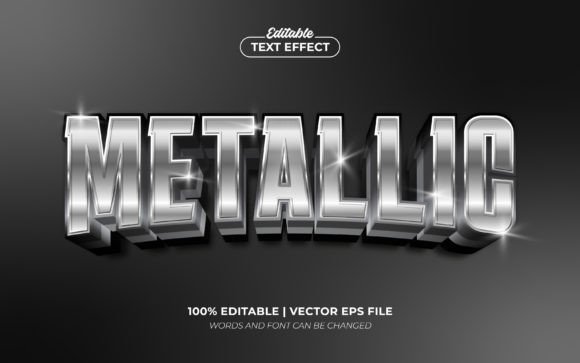
In the realm of digital graphic design, typography often serves as the primary vehicle for communication. While standard text conveys information, stylized text establishes tone and atmosphere. Among the various aesthetic trends available to designers, metallic finishes remain a perennial favorite for conveying luxury, modernity, and impact. Chrome Text Effects represent a specific category of Photoshop templates designed to apply these metallic finishes quickly and efficiently. These resources allow users to transform plain type, shapes, or logos into polished, reflective surfaces with minimal manual effort.
This evaluation examines the utility, workflow implications, and practical applications of Chrome Text Effects templates. By understanding what these tools offer and where they fit within a broader design strategy, creators can determine if they align with their specific project goals and technical capabilities.
Understanding the Functionality of Chrome Templates
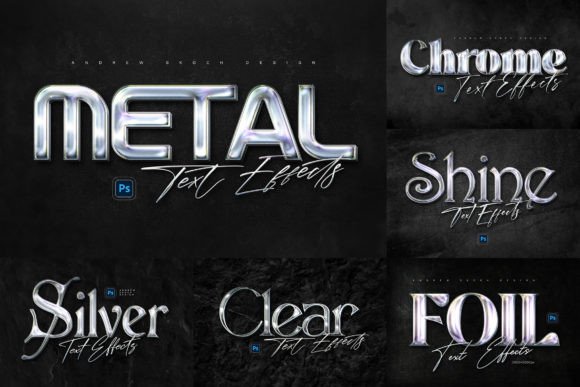
At its core, a Chrome Text Effect is a pre-configured Photoshop (PSD) file that utilizes layer styles, blending modes, and adjustment layers to simulate the appearance of polished metal. The specific resource in question provides six distinct variations of this effect, each tailored to a different visual outcome. Unlike creating a chrome finish from scratch—which requires a deep understanding of lighting physics, reflection maps, and complex gradient meshes—these templates automate the process through Smart Objects.
The mechanism is straightforward: the user opens the PSD file, locates the designated Smart Object layer, and places their own design, text, or logo inside it. Upon closing the Smart Object and saving, the main document updates automatically, applying the complex metallic textures and lighting effects to the new content. This "smart object replacement" feature is the defining characteristic of such templates, bridging the gap between high-end custom rendering and rapid prototyping.
Key Features and Technical Specifications
When assessing the viability of a design asset, technical specifications are critical. The Chrome Text Effects package includes six separate PSD files, ensuring variety without clutter. Each file is sized at 3000×2000 pixels with a resolution of 300 DPI. This resolution is significant; it ensures that the output is suitable for both high-quality web display and professional print production, such as posters, flyers, or large-format signage.
The inclusion of well-organized layers is another essential factor. A disorganized file structure can lead to hours of wasted time troubleshooting why an effect is not rendering correctly. In this case, the emphasis on organization suggests that the workflow is intended to be streamlined. Furthermore, the provision of a PDF help file containing font download links addresses a common pain point in template usage: missing typography. Without the correct fonts, the visual integrity of the design is compromised. Providing these links directly supports a smoother user experience.
Practical Applications and Use Cases
The versatility of Chrome Text Effects makes them applicable across a wide range of media. The metallic sheen is particularly effective in contexts where attention-grabbing visuals are required. Common use cases include:
- Social Media Branding: Facebook covers and YouTube channel banners often require bold, high-contrast imagery to stand out in crowded feeds. The reflective nature of chrome draws the eye immediately.
- Cinematic and Entertainment Titles: Movie titles, video game logos, and cinematic intros frequently utilize metallic textures to evoke a sense of scale, power, or futuristic aesthetics.
- Print Marketing: Flyers, posters, and website banners benefit from the depth and dimension that chrome effects provide, making the text appear tactile and premium.
- Wall Sign Simulations: One specific style mentioned involves a wall sign effect on dark wall textures. This is ideal for mockups where a designer needs to visualize how a logo would look mounted on a physical surface.
For businesses or individuals looking to present a brand with a "cool metallic style," these templates offer a consistent way to achieve a cohesive look across multiple platforms without needing advanced 3D modeling skills.
Benefits and Workflow Efficiency
The primary advantage of using Chrome Text Effects is time efficiency. Creating a photorealistic chrome texture manually can take anywhere from 30 minutes to several hours, depending on the complexity of the lighting and the desired level of realism. With a template, this process is reduced to a few clicks. This speed allows designers to iterate quickly, testing different color schemes or layouts before committing to a final direction.
Additionally, the "100% editable" nature of these files offers flexibility. If a client requests a change in the wording or the logo shape, the designer does not need to recreate the entire effect. They simply update the Smart Object. This adaptability is crucial in freelance environments where revisions are frequent.
Compatibility is also a strong selling point. Support for Photoshop versions ranging from CC2018 to the latest iterations ensures that most professional users can access these files without software conflicts. This longevity protects the investment, as the files are unlikely to become obsolete due to minor software updates.
Tradeoffs and Considerations
While the benefits are clear, there are tradeoffs to consider. The most significant limitation is the potential lack of uniqueness. Because these templates are available to many users, there is a risk that the resulting designs may look similar to other projects using the same assets. For brands requiring a highly unique, proprietary visual identity, relying solely on pre-made effects might dilute their distinctiveness.
Furthermore, while the effects are high quality, they are static simulations. They do not react dynamically to changes in the environment like a true 3D render would. If a project requires the text to interact with specific environmental lighting conditions that differ significantly from the template's preset, manual adjustments will still be necessary.
Another consideration is the learning curve for beginners. Although the instructions state the process is "very easy," users unfamiliar with Photoshop's Smart Object functionality may initially struggle to locate the correct layer or understand how to replace the content effectively. However, the included PDF guide aims to mitigate this barrier.
Decision-Making Insights
To determine if Chrome Text Effects are the right choice for your project, consider the following criteria:
- Project Timeline: If you are working under a tight deadline and need a professional metallic look immediately, these templates are a strong fit. If you have ample time to craft a bespoke 3D render, building from scratch might yield more unique results.
- Technical Skill Level: For intermediate Photoshop users who understand layers but want to avoid complex masking and blending, this tool is ideal. Absolute beginners may find the interface daunting without prior knowledge of the software.
- Output Requirements: If the final output requires 300 DPI for print, the provided resolution is sufficient. For web-only graphics, the high resolution ensures crisp scaling down to smaller sizes.
- Budget Constraints: Compared to hiring a specialist to create custom 3D typography, purchasing or downloading a template set is a cost-effective solution for achieving high-end visuals.
Alternatives Worth Considering
There are scenarios where alternatives may be preferable. If the design requires a matte, brushed, or oxidized metal finish rather than a shiny chrome look, these specific templates may not suffice. In such cases, searching for "brushed metal" or "rustic metal" effects would be more appropriate.
Additionally, for projects involving motion graphics, static PSD files are insufficient. Animators would need to use 3D software like Cinema 4D or Blender to create dynamic, moving chrome text that reacts to camera movement. Similarly, if the goal is to maintain complete originality for a trademarked logo, creating a custom vector-based effect or a 3D model is safer to avoid copyright or similarity issues associated with stock templates.
Conclusion
Chrome Text Effects serve as a powerful tool for designers seeking to add depth, luxury, and visual interest to their typography and logos. By leveraging Smart Object technology, they democratize high-end metallic styling, making it accessible to a wider range of users. While they offer significant advantages in terms of speed, resolution, and ease of use, they should be evaluated against the specific needs for uniqueness and environmental interaction in a given project.
For those creating posters, social media covers, or cinematic titles where a polished, trendy aesthetic is paramount, these templates provide a reliable and efficient solution. However, for projects demanding absolute customization or dynamic 3D integration, traditional modeling techniques remain the superior alternative. Ultimately, the decision rests on balancing the need for rapid, high-quality output with the desire for a completely bespoke visual identity.